2025-11-02
creating a fully encrypted github repository using git-remote-gcrypt
corporate encryption promises mean nothing when the breach happens and your data’s already on someone else’s server. self-hosting fixes this but most people don’t have time to self-host everything. so the practical move: encrypt before you push. the server gets blobs. you keep the keys.
git-remote-gcrypt does this transparently. it wraps your git remote so every push is GPG-encrypted before it leaves your machine. github sees ciphertext. a leak means nothing to whoever finds it.

credits: nowk_n via vxunderground
prerequisites
linux or WSL, then:
sudo apt update && sudo apt install git-remote-gcrypt gnupgssh keys
these are for github auth, not encryption. generate or reuse existing:
sudo su
mkdir -p /root/.ssh && chmod 700 /root/.ssh
ssh-keygen -t ed25519 -C "dev@github" -f /root/.ssh/id_dev_ed25519
chmod 600 /root/.ssh/id_*
grab the public key and add it to github under Settings → SSH and GPG:
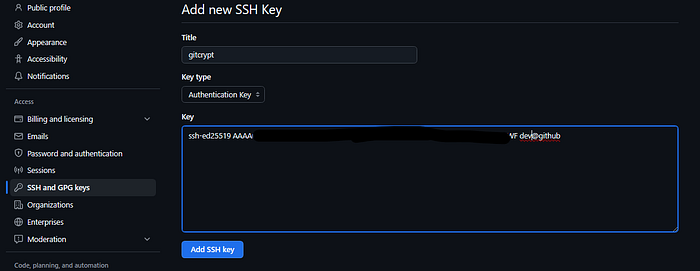
sudo cat /root/.ssh/id_dev_ed25519.pubverify it worked:
ssh -T github-dev
# Hi <user>! You've successfully authenticated...
gpg keys
this is the actual encryption layer. generate or import — pick one.
generate new:
sudo gpg --quick-generate-key "dev <your@email.com>" rsa4096 sign,encrypt 2y
sudo gpg --list-secret-keys --keyid-format=long
import existing:
sudo gpg --import /path/to/dev-private-key.asc
sudo gpg --list-secret-keys --keyid-format=long
note the key ID from the output (looks like 980F354B5EEF0B51). you’ll need it.
enable GPG commit signing globally:
git config --global commit.gpgsign truesetting up the encrypted remote
init your repo:
cd /path/to/your-repo
git init
git add . && git commit -m "initial commit"
add the gcrypt remote — the gcrypt:: prefix is what triggers encryption:
git remote add dev gcrypt::github-dev:your-user/your-repo.gitconfigure which GPG key encrypts/signs pushes to this remote:
git config remote.dev.gcrypt-signingkey 980F354B5EEF0B51
git config remote.dev.gcrypt-participants 980F354B5EEF0B51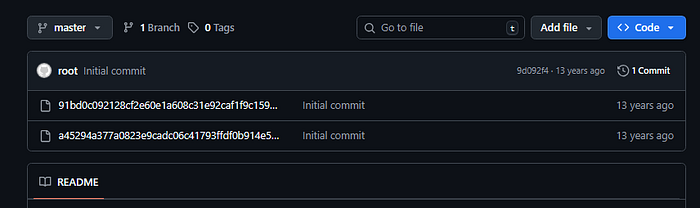
multiple collaborators? add each person’s key ID to gcrypt-participants, space-separated. everyone listed can decrypt pulls.
workflow
# commit (GPG-signed)
git add . && git commit -m "your message"

# push (encrypted with your GPG before leaving your machine)
git push dev main

# pull (decrypts automatically using your local GPG key)
git pull dev main
two things to know: the github repo needs to exist before first push (empty is fine), and gcrypt force-pushes under the hood so always pull before you push.
local files stay plaintext. the remote gets ciphertext. you’re the only one who can read it.